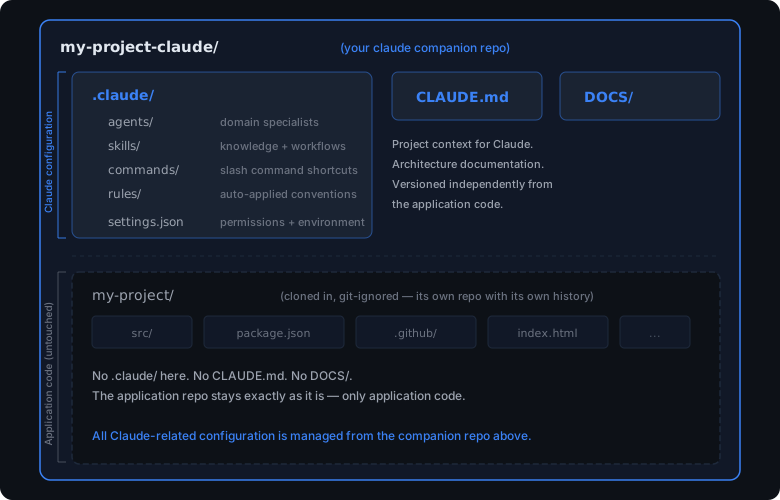
Most implementations of Claude Code I've come across keep everything in one place: .claude/, CLAUDE.md, application code, all in the same repo. That's the standard approach, it's what Anthropic's documentation describes, and it's what the tooling is designed for. There's nothing wrong with it.
What I'm about to describe is a personal preference. It's based on how I like to organise my work, not a recommendation that everyone should follow. After setting up a few projects, I found that keeping my Claude configuration in its own repo, completely separate from the application code, suits the way I think about tooling versus source code. The app repo goes inside as a git-ignored subdirectory. It's an extra step, and for a lot of projects the inline approach is perfectly fine. But there are a few reasons I find this worth the effort, and this post walks through the setup, the thinking behind it, and when it might make sense for you too.
Why I Prefer a Separate Claude Companion Repo
The core benefit is separation of concerns. Claude configuration is about how I work with the code. The application code is the code itself. They serve different audiences, change at different rates, and have different visibility requirements.
When I open Claude Code from the companion repo root, it reads .claude/ from there and has full access to the application code inside. Every agent, skill, command, and rule is available. But the application repo itself doesn't know or care that Claude configuration exists. It's just code.
This means a few things in practice:
-
The app repo stays clean. No
.claude/directory, noCLAUDE.md, noDOCS/folder cluttering the project. If I stop using Claude Code tomorrow, the app repo is exactly as it would have been without it. -
Claude config is versioned independently. I can iterate on agents, skills, and rules without creating noise in the app's git history. Configuration changes don't show up in pull requests for application features.
-
Standardisation changes stay out of app PRs. When you manage Claude configuration in the same repo as application code, every tweak to an agent definition, every new rule, every skill update creates a commit in the app's history. That means pull requests for application features end up with unrelated Claude config diffs mixed in. Reviewers see changes to
.claude/agents/blog-agent.mdalongside changes tosrc/components/Header.tsxand have to mentally separate what's relevant. Over time, the git history fills with configuration churn that has nothing to do with the application itself. Keeping them in separate repos means application PRs contain only application changes, and Claude configuration PRs contain only configuration changes. Clean history, clean reviews. -
Every project gets the same setup. Clone the app repo inside a companion repo, run
/init(or any custom scaffolding command you prefer) to generate the project's.claude/configuration and full technical documentation, and I'm ready to go.Note:
/setup-projectis my own custom command that automates this end-to-end. It analyses the codebase and generates the full.claude/directory (agents, skills, rules, commands), aDOCS/folder with technical documentation, plusCLAUDE.mdandREADME.md, all in one shot. I'll cover how to build a reusable command like this in a separate post. -
Works with repos you don't own. If you're contributing to an open-source project, a company monorepo, or a client's codebase, you probably shouldn't (and often can't) commit
.claude/to their repo. A companion repo gives you a full Claude setup without touching their code. Your conventions, your agents, your workflows, none of it lands in a PR for the maintainers to deal with.
Something to Consider for Proprietary and Work Codebases
Open source is having a moment, and a lot of that is powered by AI tooling making contributions easier. If you're working on a genuinely open project where everything is meant to be public, committing .claude/ alongside the code is a perfectly reasonable choice and even helpful for collaborators.
The consideration matters most for proprietary work: client projects, company codebases, internal tools, or anything where the repo has a narrower audience than "the whole internet". In those contexts, whatever you commit to the repo is shared with everyone who has access to that repo.
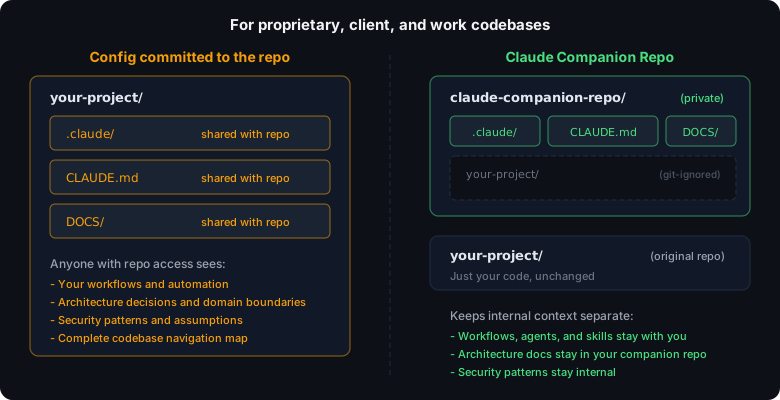
CLAUDE.md is a structured map of your codebase (architecture, conventions, integration points) written for an AI to navigate efficiently. Agent definitions reveal your domain boundaries. Skills encode your workflows and expertise. Rules capture your quality standards. That's useful context for Claude, and also a fairly detailed picture of how you work and what you know about the codebase.
There's a meaningful difference between sharing the code itself and sharing your entire process for working with that code. Keeping the configuration separate means the application repo contains only application code, while your workflows, documentation, and domain knowledge stay in your companion repo. Not because they're secret, but because they're yours and they don't need to be bundled with every clone.
A hybrid approach works well if you want the best of both. Commit a minimal .claude/ to the project repo with basic rules and a lightweight CLAUDE.md so collaborators get a baseline Claude Code experience, and keep your deeper, personal configuration in the companion repo.
Trade-offs to Be Aware Of
This pattern is not free. It solves the problems above but introduces a few of its own, and they're worth naming up front so you can decide if the trade is right for your situation.
- Two repos to manage. You now have a companion repo in addition to the application repo. Two
git statussurfaces, two places to commit, two remotes to keep pushed. Most of the time the companion repo is quiet and this is barely noticeable, but it is still a second thing to think about. - Two clones instead of one for anyone using it. Teams can absolutely share a companion repo (a private company repo works perfectly well for this), but every teammate now needs to clone two repositories instead of one and understand that the application code lives nested inside the companion. A single committed
.claude/in the application repo is just simpler: clone, open, go. You give up that simplicity in exchange for keeping the application repo clean. - Nested git-ignored repos can confuse tooling. Cloning the application repo inside the companion and relying on a gitignore entry works, but some IDEs, git UIs, and scripts get confused by nested working trees. Usually fine, occasionally annoying.
- Discoverability over time. Months later, when you come back to a project you haven't touched in a while, you need to remember that the Claude setup lives in a separate companion repo and know where it is. A committed
.claude/directory is self-documenting in a way a companion repo is not. - Onboarding friction for the pattern itself. The first time someone new to this approach opens one of your companion repos, none of it is obvious. You'll need to explain the layout, the gitignore trick, and why the application code is inside.
None of these are deal-breakers for me, but they are real. If you iterate on your Claude config frequently, touch a mix of public, private, and client codebases, or want to keep configuration changes out of the application's git history, the trade-offs are easy to absorb. If you're optimising for the shortest possible path from git clone to "working Claude Code setup" (for yourself or a team), a committed .claude/ in the application repo is genuinely simpler.
The Setup
Here's the actual sequence I follow every time I start with a new project.
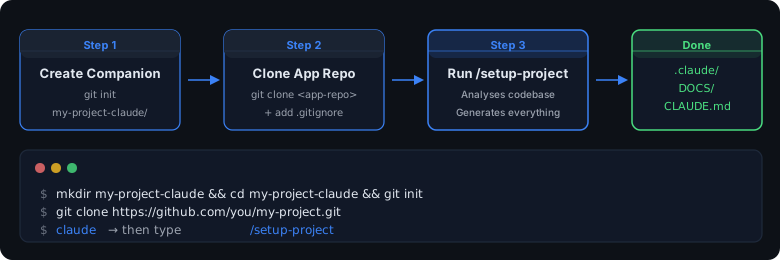
1. Create the Companion Repo
mkdir my-project-claude && cd my-project-claude
git init
The naming convention I use is {project-name}-claude. Simple enough to know what it is at a glance when browsing my workspace.
2. Clone the App Repo Inside
git clone https://github.com/you/my-project.gitThis creates my-project/ inside the companion repo. It's a normal git repo with its own history and remotes. The companion repo doesn't interfere with it.
3. Set Up .gitignore
# Application source (managed separately)
my-project/

# OS files
.DS_Store

# Override global gitignore to track CLAUDE.md
!CLAUDE.md
The important line is my-project/. The companion repo never commits the application code. The !CLAUDE.md line overrides global gitignore patterns (a lot of developers have CLAUDE.md in their global ignore list, and you absolutely want this file tracked).
4. Run /setup-project
Open Claude Code from the companion repo root and type /setup-project. This:
- Scans the codebase and asks you to confirm the target directory
- Runs a deep analysis, reading configs, entry points, CSS, JS, the lot
- Generates
.claude/(agents, skills, commands, rules, settings) tailored to what it found - Generates
DOCS/with architecture documentation - Creates
CLAUDE.mdandREADME.md
A few minutes later, you have a complete, project-specific Claude configuration. None of it touches the application repo.
I'll cover what gets generated and how the configuration primitives fit together in a follow-up post. This post is about the structure and the reasoning; that one will be about the internals.
5. Keeping It Current
Projects change, configuration drifts. After significant structural changes (a major refactor, a new module, a shift in conventions), I re-run whatever scaffolding command I used at setup so the config reflects the current state of the codebase.
Note:
/realign-projectis my own custom command, the companion to/setup-project. It re-analyses the codebase, diffs against the existing.claude/,DOCS/,CLAUDE.md, andREADME.md, and updates only what's changed instead of regenerating from scratch. Takes a couple of minutes and keeps everything honest. I'll cover how both commands are built in the follow-up post on reusable workflows.
What This Looks Like in Practice
Here's the actual structure of the claude companion repo I use for this site:
aaronmedina-dev.github.io-claude/       # Companion repo
├── .claude/
│   ├── settings.json
│   ├── agents/                         # 5 domain agents
│   ├── commands/                       # 5 slash commands
│   ├── skills/                         # 4 knowledge skills
│   └── rules/                          # 6 coding convention rules
├── DOCS/                               # 10 documentation files
├── CLAUDE.md
├── README.md
├── .gitignore
│
└── aaronmedina-dev.github.io/          # App repo (git-ignored)
    ├── .eleventy.js
    ├── index.html
    ├── blog/
    ├── cidr-calculator/
    ├── pert/
    ├── snake/
    ├── claude-code-leak/
    └── whatthepatch/
22 configuration files, 10 documentation files, all in the companion repo. The application repo is a GitHub Pages portfolio site with a blog, mini-tools, and doc sites. It has no idea Claude configuration exists. Every Claude Code session starts with full context about how the project works, and the app stays exactly as it was.
This setup isn't necessary for every project. For private repos where the team all uses Claude Code, committing .claude/ directly to the project is simpler and there's nothing wrong with that. But if you're working with public repos, contributing to codebases you don't own, or you just prefer keeping your tooling separate from your code, a separate companion repo is a straightforward way to get there. Five minutes to set up, /realign-project to maintain, and the application repo never knows the difference.
Comments