If you've tried running multiple Claude Code sessions against the same repository, you've probably hit the wall fast. One session checks out a feature branch while the other is mid-edit on main. Stash conflicts pile up. Files get overwritten. It turns into a mess where the agents are fighting each other instead of helping you ship faster.
The root of the problem is simple: a single git checkout means a single working directory. Two agents sharing one checkout is like two people trying to type on the same keyboard.
Git worktrees fix this completely, and they've been built into Git since version 2.5. They're just not widely known.
What Are Git Worktrees?
A git worktree lets you check out multiple branches of the same repository into separate directories, all sharing the same .git history. No cloning, no duplicating objects, no syncing between copies. Every worktree sees the same commits, branches, and refs because they all point back to a single .git directory.
Think of it this way: instead of one folder with one checked-out branch, you get multiple folders, each on a different branch, all connected to the same repo.
The Problem: One Checkout, Multiple Agents
Here's what happens when you try to run multiple Claude Code sessions in the traditional setup:
my-repo/
  git checkout feature/1    <- Agent 1 wants this
  git checkout feature/2    <- Agent 2 wants this
  CONFLICT: agents fighting for the same files
Only one branch can be checked out at a time. The moment one agent switches branches, the other loses its working state. You end up with:
- Stash juggling: agents stashing and popping each other's changes
- Checkout conflicts: uncommitted work blocking branch switches
- Serial execution: only one agent can do meaningful work at a time
This defeats the entire purpose of running multiple agents.
The Solution: Git Worktrees
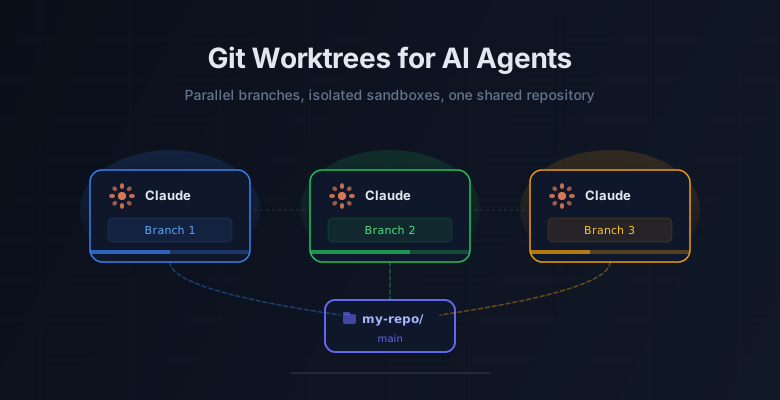
With worktrees, each agent gets its own directory with its own checked-out branch, while sharing the same underlying repository:

Each worktree is a fully functional working directory. Agents can read, write, commit, and push independently. No conflicts, no stashing, no stepping on each other's work.
Setting Up Worktrees for Claude Code
Starting from your main repository:
cd my-repoCreate Worktrees for Each Task
Create separate directories for each agent's work. You can create a worktree for an existing branch or create a new one on the fly:
# Worktree for an existing branch
git worktree add ../feature-1 feature/1

# Worktree with a new branch (created from current HEAD)
git worktree add -b feature/2 ../feature-2

# Another worktree
git worktree add -b feature/3 ../feature-3
This gives you a directory structure like:
workspace/
  my-repo/           <- main branch (untouched)
  feature-1/         <- Agent 1 works here
  feature-2/         <- Agent 2 works here
  feature-3/         <- Agent 3 works here
Point Each Claude Session to Its Worktree
Open separate Claude Code sessions, each pointed at a different worktree directory:
# Terminal 1
cd ../feature-1
claude

# Terminal 2
cd ../feature-2
claude

# Terminal 3
cd ../feature-3
claude
Each Claude session now has full, isolated access to the repo on its own branch. They can all run simultaneously without any interference.
Running Agents Concurrently
This is where worktrees really shine. Because each worktree is a completely separate directory on disk, you can run multiple Claude Code sessions at the same time, not one after the other, but truly in parallel.
Here's what the file structure actually looks like on disk:
workspace/
|
+-- my-repo/                    <- original repo (main branch)
|   +-- .git/                   <- the ONLY .git directory (shared by all)
|   +-- src/
|   +-- tests/
|   +-- package.json
|   +-- ...
|
+-- feature-1/                  <- worktree 1 (feature/1 branch)
|   +-- .git                    <- small file pointing to my-repo/.git
|   +-- src/
|   |   +-- module-a.js         <- Claude 1 is editing this
|   |   +-- module-b.js         <- Claude 1 is editing this
|   +-- tests/
|   +-- package.json
|   +-- ...
|
+-- feature-2/                  <- worktree 2 (feature/2 branch)
|   +-- .git                    <- small file pointing to my-repo/.git
|   +-- src/
|   |   +-- module-c.js         <- Claude 2 is editing this
|   |   +-- module-d.js         <- Claude 2 is editing this
|   +-- tests/
|   +-- package.json
|   +-- ...
|
+-- feature-3/                  <- worktree 3 (feature/3 branch)
    +-- .git                    <- small file pointing to my-repo/.git
    +-- src/
    +-- tests/
    |   +-- module-a.test.js    <- Claude 3 is writing this
    |   +-- module-c.test.js    <- Claude 3 is writing this
    +-- package.json
    +-- ...
Each directory is a full copy of the project files, but they all share the same .git object store. The .git entry in each worktree is just a small text file pointing back to my-repo/.git/worktrees/<name>, not a duplicate.
With this setup, you can have three terminals open side by side, each running Claude Code, each making changes to different files on different branches, all at the same time. Claude 1 is working on feature 1, Claude 2 is working on feature 2, and Claude 3 is working on feature 3. None of them waiting on the others, none of them aware the others even exist.
When all three are done, you merge their branches back into main and you've accomplished three tasks in the time it would have taken to do one.
Why This Works
Git worktrees share the object store (the .git directory) but maintain separate:
- Working directories: each worktree has its own files on disk
- Index/staging areas: each can stage independently
- HEAD pointers: each tracks its own branch
When Agent 1 commits to feature/1, Agent 2 in feature/2 isn't affected at all. But if Agent 2 does a git log main, it sees Agent 1's merged work immediately because they share the same repository.
This means:
- Parallel work: all agents run simultaneously, no waiting
- Isolated sandboxes: changes in one worktree don't affect others
- Shared history: all commits, branches, and tags are visible everywhere
- Instant merges: merging between worktrees is a regular
git mergesince it's the same repo
Practical Workflow
Here's how a typical multi-agent session looks:
1. Plan your branches
Decide what each agent will work on. Good candidates for parallel work:
- Independent features that don't touch the same files
- Tests and implementation (one agent writes tests, another writes code)
- Refactoring in one area while building in another
- Documentation updates alongside code changes
2. Create the worktrees
git worktree add -b feature/1 ../feature-1
git worktree add -b feature/2 ../feature-2
git worktree add -b feature/3 ../feature-3
git worktree add -b feature/4 ../feature-4
3. Run your Claude sessions
Open each in its own terminal, each pointed at its worktree. Give each agent clear, scoped instructions about what to work on.
4. Merge the results
When the agents are done, merge everything back:
cd my-repo
git merge feature/1
git merge feature/2
git merge feature/3
git merge feature/4
If the work was truly independent (different files), these merges will be clean fast-forwards or automatic merges.
5. Clean up
Remove worktrees you no longer need:
git worktree remove ../feature-1
git worktree remove ../feature-2
git worktree remove ../feature-3
git worktree remove ../feature-4
Quick Reference
# Create worktree for existing branch
git worktree add ../feature-1 feature/1

# Create worktree with new branch
git worktree add -b feature/2 ../feature-2

# List all worktrees
git worktree list

# Remove a worktree
git worktree remove ../feature-1

# Prune stale worktree references
git worktree prune
Things to Watch Out For
One branch per worktree. Git enforces that the same branch can't be checked out in two worktrees simultaneously. This is a feature, not a limitation. It prevents two agents from modifying the same branch.
Don't delete worktree directories manually. Always use git worktree remove so Git cleans up its internal references. If you do accidentally delete one, git worktree prune fixes the stale entries.
Lock long-lived worktrees. If you have a worktree you want to keep around (like a persistent staging environment), use git worktree lock ../staging to prevent accidental removal.
Merge conflicts still happen. If two agents modify the same file on different branches, you'll hit conflicts when merging. The difference is that you deal with it once at merge time, not constantly during development.
Usage limits burn faster. Three agents running in parallel means three times the API calls, token consumption, and rate limit usage happening simultaneously. If you're on a plan with daily or monthly limits, parallel sessions will eat through your quota much faster than working sequentially. Plan your parallel workload around your budget. Save concurrency for tasks where the time savings justify the cost, and use a single session for smaller or less time-sensitive work.
Git worktrees aren't new, but they become significantly more useful when you're running AI agents. The pattern is straightforward: one worktree per agent, one branch per task, merge when done. It turns what would be a chaotic mess of checkout conflicts into clean, parallel workflows where each agent stays in its own lane.
Comments