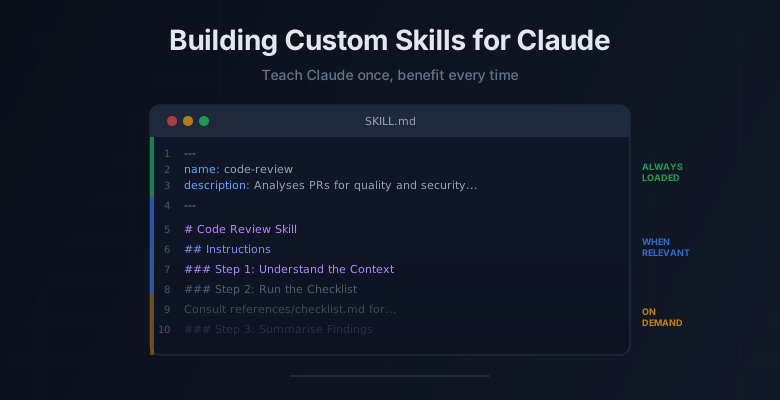
I've been seeing a lot of posts lately about Anthropic's new resource on building skills for Claude. If you haven't come across it yet, they put out a 33-page PDF called The Complete Guide to Building Skills for Claude covering everything from folder structure to distribution. It's pretty thorough, but it also reads like product documentation and there's a fair bit to wade through.
So I figured I'd break it down into the parts that actually matter and walk through building a skill from scratch. If you've been using Claude for a while and keep re-explaining the same workflows, preferences, or domain knowledge every conversation, skills are basically how you fix that.
What Are Skills?
In short, a skill is a folder with instructions that teach Claude how to handle specific tasks or workflows. You teach it once, and it applies that knowledge automatically whenever it's relevant. No more repeating yourself every session.
At its core, a skill is just a folder with a SKILL.md file. No framework, no build step, no SDK. You write instructions in Markdown, slap some YAML frontmatter on top, and Claude picks it up. That's it.
Progressive Disclosure: How Skills Actually Load
The thing I found most interesting in Anthropic's guide is how skills actually get loaded into context. They don't just dump everything into Claude's context window at once. Instead, there's a three-level system:
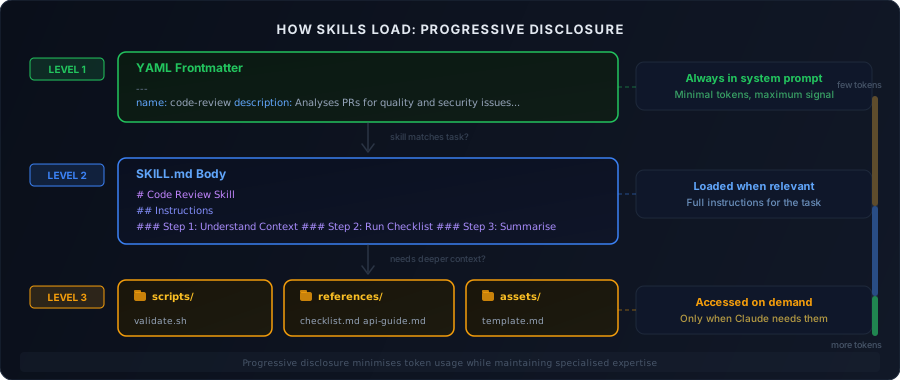
Level 1: Frontmatter is always sitting in Claude's system prompt. It's just the name and description, enough for Claude to know when the skill should kick in. Costs almost nothing in tokens.
Level 2: SKILL.md body gets pulled in when Claude decides the skill is relevant to what you're asking. This is where your actual instructions, workflows, and examples live.
Level 3: Linked files like scripts, references, and assets are only accessed when Claude needs them mid-execution. Your detailed docs, validation scripts, and templates sit here until they're actually called for.
The upshot is that token usage stays low while Claude still has access to specialised knowledge when the situation calls for it.
Anatomy of a Skill
A single skill is just a folder. The structure looks like this:
code-review/
├── SKILL.md              # Required: main skill file
├── scripts/              # Optional: executable code
│   ├── validate.sh
│   └── process_data.py
├── references/           # Optional: documentation
│   ├── api-guide.md
│   └── examples/
└── assets/               # Optional: templates, icons
    └── report-template.md
Only SKILL.md is required. Everything else is optional and gets loaded progressively when needed.
Where Do Skills Live?
If you're building more than one skill, each one gets its own folder. You can keep them all in one place:
my-skills/
├── code-review/
│   ├── SKILL.md
│   └── references/
│       └── checklist.md
├── blog-post/
│   └── SKILL.md
└── sprint-planning/
    ├── SKILL.md
    └── scripts/
        └── fetch_velocity.py
Where you actually put these depends on how you're using Claude:
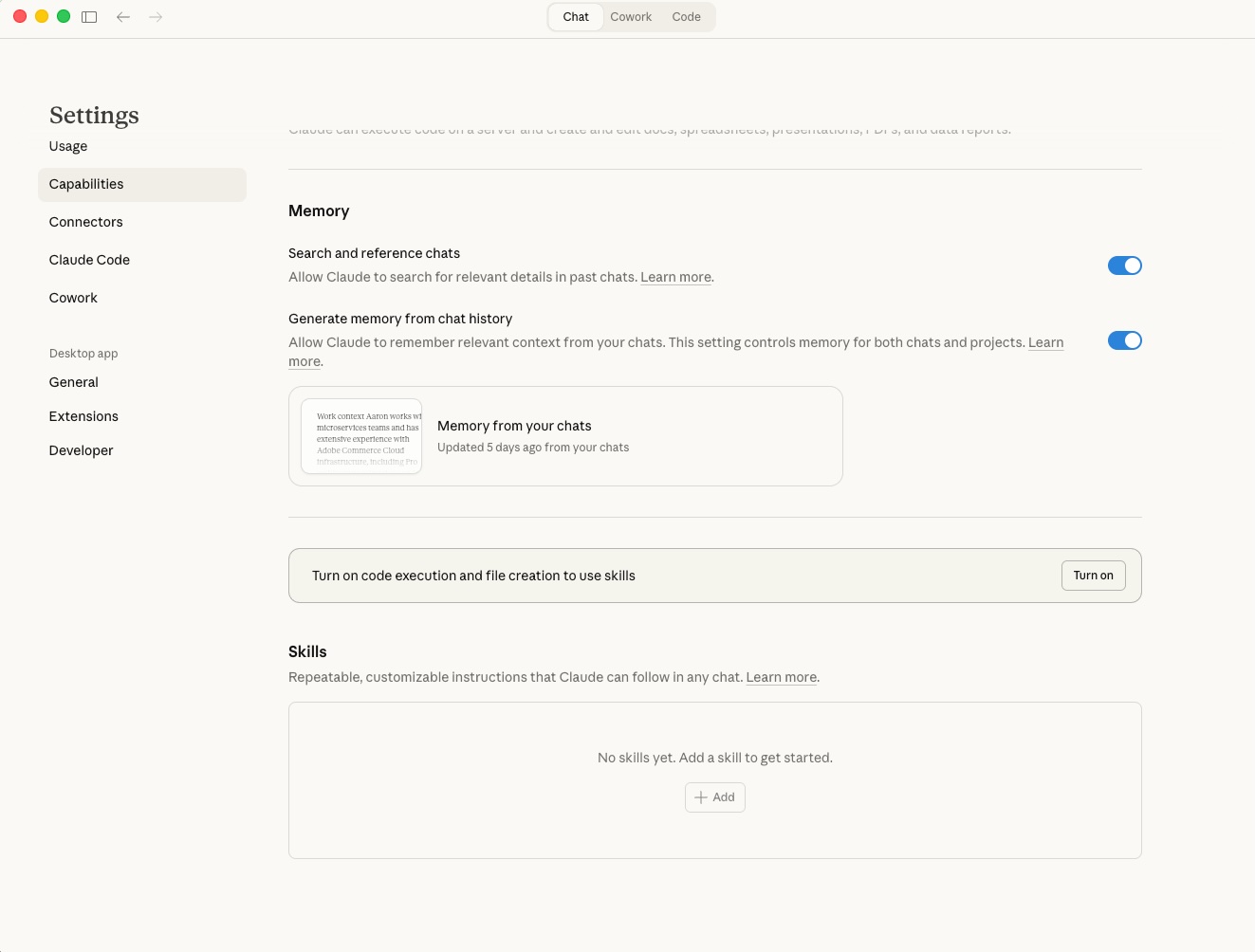
Claude.ai : Zip each skill folder individually (e.g. code-review.zip), then go to Settings > Capabilities > Skills and upload each one. You toggle them on or off from there.
Claude Code : Drop the skill folders into your Claude Code skills directory. Claude picks them up automatically.
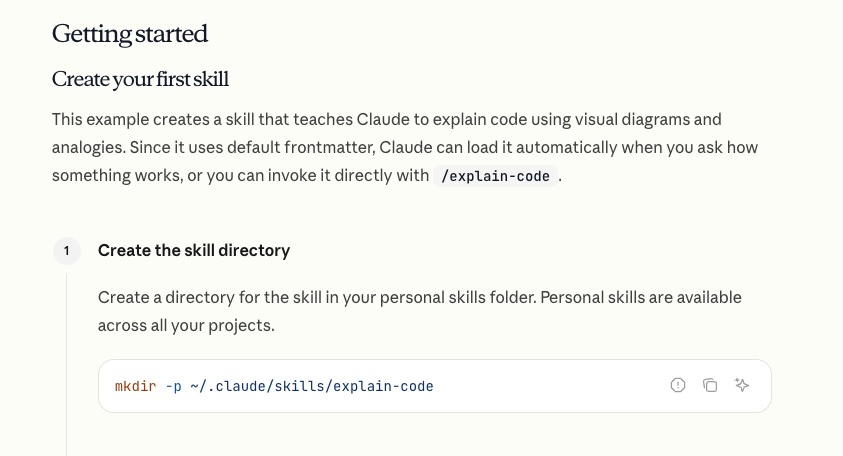
Reference for Claude Code skills directory.
API : Skills can be attached to API requests via the container.skills parameter. See the API section further down for more on that.
Naming Rules
These are strict. Get them wrong and your upload will just fail:
- SKILL.md must be exactly
SKILL.md(case-sensitive). Notskill.md, notSKILL.MD. - Folder name must be kebab-case:
code-reviewworks,Code_Reviewdoesn't. - No README.md inside the skill folder. Documentation goes in
SKILL.mdorreferences/. - No "claude" or "anthropic" in the skill name. Those are reserved.
The Frontmatter
Every SKILL.md starts with YAML frontmatter, and honestly this is the most important part of the whole skill. It's what determines whether Claude ever bothers loading it.
---
name: your-skill-name
description: What it does and when to use it. Include specific trigger phrases.
---
You need two fields:
name in kebab-case, matching the folder name.
description covering both what the skill does AND when to use it. Keep it under 1024 characters and don't use XML angle brackets (< or >).
The description is where most people trip up. Compare these:
# Bad: too vague, Claude has no idea when to activate
description: Helps with projects.

# Bad: no trigger phrases, Claude can't tell when users need this
description: Creates sophisticated multi-page documentation systems.

# Good: specific action + clear trigger phrases
description: >
  Analyses pull requests for code quality, security issues,
  and adherence to team conventions. Use when user asks to
  "review this PR", "check this code", or "do a code review".
If your skill isn't triggering, the description is almost always the culprit. Quick debugging trick: ask Claude "When would you use the code-review skill?" and it'll quote the description back at you, so you can see exactly what it's working with.
You can also tack on optional fields:
---
name: code-review
description: Analyses pull requests for code quality...
license: MIT
metadata:
  author: Your Name
  version: 1.0.0
---
Writing the Instructions
After the frontmatter, the rest of SKILL.md is just standard Markdown. Anthropic recommends structuring it around three sections:
Instructions. Step-by-step workflow with clear, actionable directions. "Run python scripts/validate.py --input {filename} to check data format" beats "validate the data before proceeding" every time.
Examples. Concrete scenarios showing what the user says, what Claude does, and what the result looks like.
Troubleshooting. Common failures and how to recover from them.
The main thing is to be specific. Claude follows precise instructions reliably but struggles with vague ones. "Check the code" is ambiguous. "Check for SQL injection vectors in any raw query strings" gives it something to actually work with.
Building a Practical Skill: Code Review
Enough theory. Let's build something you can actually use. This skill does systematic code reviews following a consistent checklist.
Folder Structure
code-review/
├── SKILL.md
└── references/
    └── checklist.md
SKILL.md
This is the complete file. The frontmatter (between the --- markers) tells Claude when to activate, and everything below it is the actual instructions Claude follows. It all goes in one file:
---
name: code-review
description: >
  Performs systematic code reviews with a consistent checklist
  covering security, performance, readability, and best practices.
  Use when user asks to "review this code", "check this PR",
  "do a code review", or "look over these changes".
---

# Code Review Skill

## Instructions

When asked to review code, follow this process:

### Step 1: Understand the Context
- Ask what the code is meant to accomplish (if not obvious)
- Identify the language, framework, and relevant conventions
- Note the scope: full PR, single function, or specific concern?

### Step 2: Run the Checklist

For each category, note whether items pass, fail, or are not applicable.

**Security**
- No hardcoded secrets, API keys, or credentials
- Input validation at system boundaries
- No SQL injection, XSS, or command injection vectors
- Proper authentication and authorisation checks

**Performance**
- No unnecessary database queries or N+1 patterns
- Appropriate use of caching where applicable
- No blocking operations in async contexts

**Readability**
- Clear naming for variables, functions, and classes
- Functions do one thing and do it well
- No deeply nested conditionals (max 3 levels)

**Best Practices**
- Error handling covers failure modes
- No code duplication that should be abstracted
- Tests cover the critical paths

For the extended checklist, consult `references/checklist.md`.

### Step 3: Summarise Findings

Present findings grouped by severity:
1. **Critical** : must fix before merge
2. **Important** : should fix
3. **Suggestions** : nice to have
4. **Positive** : things done well

Always end with at least one positive observation.

## Examples

### Example 1: Quick function review
**User says:** "Can you review this function?"
**Actions:** Apply checklist to the provided code.
**Result:** Grouped findings with severity levels.

### Example 2: Full PR review
**User says:** "Review this PR for me"
**Actions:** Read all changed files, apply checklist across the full PR.
**Result:** Review with file-by-file and overall findings.
references/checklist.md
This is the Level 3 stuff. It only gets loaded when Claude actually needs the deeper context:
# Extended Code Review Checklist

## Security Deep Dive
- OWASP Top 10 considerations
- Dependency vulnerability checks
- Secrets scanning patterns
- CORS and CSP configuration

## Performance Patterns
- Database query optimisation techniques
- Caching strategies (in-memory, distributed, CDN)
- Lazy loading and pagination patterns

## Language-Specific Checks

### JavaScript/TypeScript
- Proper async/await error handling
- Memory leak patterns (event listeners, closures)
- Bundle size impact

### Python
- Type hints on public APIs
- Generator usage for large datasets
- Context managers for resources
The references/checklist.md gives Claude access to deeper domain knowledge without bloating the main instructions. It only reads this when the review actually warrants that level of detail.
The Three Skill Categories
Anthropic's guide breaks skills into three categories. Worth knowing which bucket yours falls into since it affects how you structure things.
Category 1: Document and Asset Creation
Skills that produce consistent output. Reports, presentations, frontend designs from specs. These generally don't need MCP since they just use Claude's built-in capabilities.
Key techniques: embedded style guides, template structures, quality checklists.
Category 2: Workflow Automation
Multi-step processes that benefit from a consistent methodology. These coordinate between steps and can span multiple tools.
Key techniques: step-by-step workflows with validation gates, iterative refinement loops, templates for common structures.
Category 3 MCP Enhancement
Workflow guidance on top of MCP server access. Instead of just giving Claude raw tool access, these teach it how to use your connected services properly.
Key techniques: coordinated multi-MCP calls in sequence, embedded domain expertise, error handling for common MCP issues.
The code review skill we built above is a Category 2. If you wired up a GitHub MCP integration to automatically fetch PR diffs, it'd become a Category 3.
Skill Patterns
The guide documents several patterns from early adopters. These three come up the most:
Sequential Workflow
For tasks that follow a strict order where each step depends on the last:
### Step 1: Create Account
Call MCP tool: create_customer
Parameters: name, email, company

### Step 2: Setup Payment
Call MCP tool: setup_payment_method
Wait for: payment method verification

### Step 3: Create Subscription
Call MCP tool: create_subscription
Parameters: plan_id, customer_id (from Step 1)
Make sure to include rollback instructions for when steps fail partway through.
Multi-MCP Coordination
For workflows that span multiple services. Structure them as phases with clear handoffs:
### Phase 1: Design Export (Figma MCP)
1. Export design assets
2. Generate specifications

### Phase 2: Task Creation (Linear MCP )
1. Create development tasks
2. Attach asset links from Phase 1

### Phase 3: Notification (Slack MCP)
1. Post handoff summary to #engineering
Validate data between phases before moving on.
Iterative Refinement
When output quality improves with each pass. Generate, check, fix, repeat:
### #Initial Draft
1. Fetch data via MCP
2. Generate first draft

### Quality Check
Run validation: scripts/check_report.py

### Refinement Loop
1. Address each identified issue
2. Regenerate affected sections
3. Re-validate
4. Repeat until quality threshold met
Testing Your Skill
You can test at three levels depending on how rigorous you want to be.
1. Trigger Testing
Does your skill load when it should? Does it stay quiet when it shouldn't?
Should trigger:
- "Review this code for me"
- "Can you check this PR?"
- "Look over these changes"

Should NOT trigger:
- "Write a function that calculates tax"
- "What's the weather today?"
- "Help me set up Docker"
Run 10-20 test queries. If it triggers less than 90% of the time on relevant ones, your description needs work. If it's firing on unrelated stuff, add negative triggers like "Do NOT use for simple data exploration."
2. Functional Testing
Run real tasks through the skill 3-5 times and compare the results:
- Are the outputs structurally consistent?
- Does it actually follow all the steps?
- Does error handling kick in when things break?
3. Performance Comparison
The real test: does the skill actually make things better? Try the same task with and without:
| Metric | Without Skill | With Skill |
|---|---|---|
| Back-and-forth messages | 10-15 | 2-3 |
| User corrections needed | Frequent | Rare |
| Output consistency | Variable | Consistent |
| Token consumption | ~12,000 | ~6,000 |
Distribution
Personal Use
Claude.ai: Zip the skill folder, head to Settings > Capabilities > Skills, upload the zip, toggle it on.
Claude Code: Drop the skill folder into your Claude Code skills directory.
Teams
Organisation admins can deploy skills workspace-wide with automatic updates and centralised management.
Community
Host your skill on GitHub with a clear README (at the repo level, not inside the skill folder), usage examples, and installation instructions.
Anthropic has published Agent Skills as an open standard, so skills are meant to be portable across platforms. In theory, the same skill should work whether you're on Claude or other AI platforms that adopt the standard.
Via the API
For programmatic use, the /v1/skills endpoint lets you manage skills in automated pipelines. This requires the Code Execution Tool beta. Check the Skills API Quickstart for details.
Quick Reference Checklist
Before you upload, run through this:
- Folder named in kebab-case
SKILL.mdexists (exact casing)- Frontmatter has
---delimiters nameis kebab-case, matches folder namedescriptionincludes WHAT and WHEN- No
<or>in frontmatter - Instructions are specific and actionable
- Error handling documented
- Examples provided
- Tested triggering on obvious + paraphrased requests
- Verified it doesn't trigger on unrelated topics
Anthropic's full guide goes deeper into MCP integration patterns, the skills API, and detailed troubleshooting. If you're building skills that coordinate across multiple services, the complete PDF is worth a read. But for most of us, the fundamentals covered here should be enough to get something useful built in a single sitting.
The real payoff with skills is that they compound. Every workflow you encode is one less thing you need to explain next time. Start with whatever task you find yourself repeating the most, build a skill for it, and go from there.
Comments